Best Whining Dog AI Generators: A Practical Comparison
Compare Whining Dog AI generators by reference video, photos, pricing, audio and refunds. A practical checklist with sources, without invented quality rankings.
Quick answer
To make a Whining Dog video with HuntClip, open this template and add 1 photo(s). Choose a version and quality, then generate a roughly 7-second 9:16 MP4 with sound and no watermark. Standard 480p uses 15 credits. You can sign in to spend credits or choose guest checkout with email delivery; the selected cash price is shown before payment. No prompt or editing is needed.
Whining Dog AI is a close-up dog reaction with direct eye contact, a small head tilt and a soft whining response. The focus is the face and vocal reaction, rather than full-body dancing. Upload a sharp front-facing dog photo with visible eyes, ears, mouth and muzzle so those identifying features remain available. Choose The End for a wave-and-run farewell or La Calabaza for a dancing trio. Review the generated expression and sound before sharing the finished reaction clip.
Make my Whining Dog videoPreview first. Choose your version and check the price before generating.
See the reference before you create
What should your photo show?
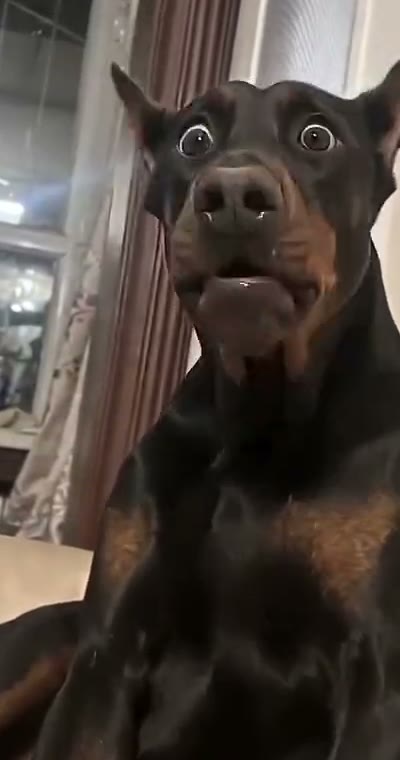
Choose a sharp, front-facing dog photo showing both eyes, ears and the muzzle. Keep the mouth visible; avoid costumes over the face and strong beauty filters that erase fur texture.
Use your own photo. JPG, PNG or WebP, under 5 MB each. Follow the role order shown in the generator.
- Hold eye contact in a stable indoor close-up
- Tilt the head and make a small mouth movement
- Finish with an attentive, expressive look
Reference source: MakeViral · Whining Dog
Choose a Whining Dog AI video generator by matching the reference, photo requirements and failure policy before comparing price. This is a buying checklist, not a paid-output quality ranking. HuntClip publishes this comparison and has not run paid generation tests on the competing services.
Which version recreates the scene you want?
Compare the sofa close-up, head tilts and vocal behavior rather than searching for any talking-pet generator. HuntClip uses one dog photo and its reviewed whining reference; MakeViral describes the Doberman-style whining scene. Preserve the uploaded dog’s own muzzle and markings, and check whether the service promises copied audio or newly generated sound.
What should you compare?
| Check | HuntClip currently offers | Verify on another generator |
|---|---|---|
| Example and ending | Full reference playback on the template page | Is the complete sequence shown, including the ending? |
| Photos | Role-specific uploads, under 5 MB each | People or pets, and portrait or whole-body requirements |
| Motion | Selected reference video with server-owned cast instructions | Video reference, motion control or text-only generation |
| Logged-in credits | Standard 480p: 15; Premium 480p: 25 | Pack conversion, length, resolution and number of runs |
| Failure | Charged credits returned on failed generation | Credits versus cash refunds and rejected-photo policy |
| Audio | Exact original recording is not guaranteed | Music rights and limits on original-song promises |
Which prices are not directly comparable?
A credit is not a dollar, and different sites use different credit units. Compare the same duration, quality, number of runs and payment method. A subscription pack's lowest per-credit price is not equivalent to a guest one-video checkout. A short 480p version is not the same product as a longer 1080p output. APT’s public pricing example lists guest Standard 480p from $7.99 and 720p at $11.99; check the actual version and final checkout total on each site.
What should you do before paying?
- Watch the whole preview and identify the actions, camera, cast count and joke.
- Check that your photo suits the assigned role, rather than judging only the cover.
- Read failure, moderation, retention and refund terms. A higher price does not guarantee stable identity replacement.
- Validate the result with a small number of permitted photos before buying more runs.
Product pages you can verify
This comparison describes public product information. Supplier prices and features can change. It does not imply endorsement by a creator or platform.
Questions before you create
How do I make a Whining Dog AI video from my photo?
To make a Whining Dog video with HuntClip, open this template and add 1 photo(s). Choose a version and quality, then generate a roughly 7-second 9:16 MP4 with sound and no watermark. Standard 480p uses 15 credits. You can sign in to spend credits or choose guest checkout with email delivery; the selected cash price is shown before payment. No prompt or editing is needed. Choose a sharp, front-facing dog photo showing both eyes, ears and the muzzle. Keep the mouth visible; avoid costumes over the face and strong beauty filters that erase fur texture.
What happens in the Whining Dog video?
A close-up canine complaint: eye contact, a tiny head tilt and a soft whining response.
What photos should I upload?
Choose a sharp, front-facing dog photo showing both eyes, ears and the muzzle. Keep the mouth visible; avoid costumes over the face and strong beauty filters that erase fur texture.
How many credits does Whining Dog cost?
Standard: 480p costs 15 credits and 720p costs 25. Premium: 480p costs 25, 720p costs 35, and 1080p costs 55. The selected price appears before submission. Failed generation returns the charged credits.
When should I choose this template?
Choose this for a dog reaction or playful complaint in close-up, with eye contact, a small head tilt and whining. Use a clear dog photo rather than a distant group shot.
Will the video include the exact original song or voice?
Audio is generated with the video. Rhythm, speech and ambience may differ from the reference; the exact original recording, lyrics, voice and lip sync are not guaranteed. Review the finished video and use music you have permission to publish.
What happens if generation fails?
Confirmed failed tasks refund their generation credits. If the provider result is uncertain, use Recover in the studio to check the existing task before trying again.
Ready to make your version?
Choose this for a dog reaction or playful complaint in close-up, with eye contact, a small head tilt and whining. Use a clear dog photo rather than a distant group shot.
Make my Whining Dog videoPreview first. Choose your version and check the price before generating.