How to Make Bike Armour Transformation AI Videos: Photos, Steps and Cost
Create a Bike Armour Transformation AI video from one photo. Mount the bike, assemble mechanical armour and close the helmet in a 15-second clip with sound.
Quick answer
To make a Bike Armour Transformation AI video with HuntClip, open this template and add 1 photo(s). Choose a version and quality, then generate a roughly 15-second 9:16 MP4 with sound and no watermark. Standard 480p uses 15 credits. You can sign in to spend credits or choose guest checkout with email delivery; the selected cash price is shown before payment. No prompt or editing is needed.
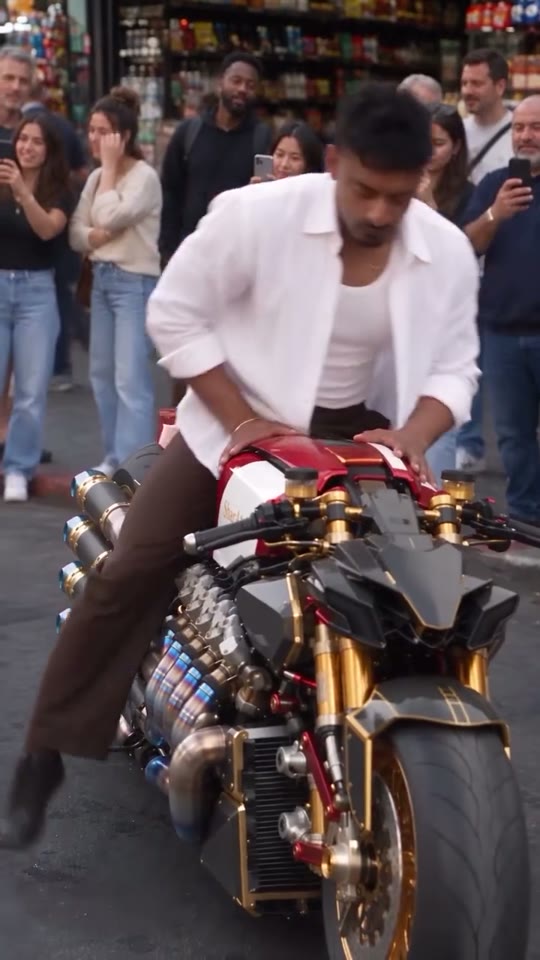
The Bike Armour Transformation reference (also searched as Bike Armor Transformation AI) is a continuous street recording with a crowd filming behind the rider. The performer gets onto a large custom motorcycle and activates its console. Red-and-black components assemble around the legs, torso and arms; the camera moves closer as the helmet closes and cyan eyes illuminate. Your face remains the identity reference before the helmet intentionally conceals it. The motorcycle stays a motorcycle throughout the transformation.
Make my Bike Armour Transformation AI videoPreview first. Choose your version and check the price before generating.
See the reference before you create
What should your photo show?
Upload one clear adult photo with an unobstructed face, hair and upper body. Avoid sunglasses, helmets and group photos. You do not need your own motorcycle or armour in the photo.
Use your own photo. JPG, PNG or WebP, under 5 MB each. Follow the role order shown in the generator.
- Mount the motorcycle and activate the console
- Watch connected armour panels close around the rider
- Close the helmet and finish fully armoured
Reference source: YeTechnical · Bike armour reference and tutorial
How to make a Bike Armour Transformation AI video
Watch the complete reference
Open the Bike Armour Transformation AI generator and play the preview through to the ending. Check the cast, action and camera framing before uploading.
Add the right photos
Upload one clear adult photo with an unobstructed face, hair and upper body. Avoid sunglasses, helmets and group photos. You do not need your own motorcycle or armour in the photo. Use clear images under 5 MB each. Assign each photo to its labeled role; select a reference or outfit when the template offers those options.
Choose a version and review the price
Select Standard or Premium and an available resolution. Check the displayed duration and final credit or checkout price before you submit. No prompt is required.
Check your video and download the MP4
Wait for the task to finish, then watch every shot, including turns and the ending. Download the finished MP4 within 30 days. If generation fails, follow the refund status shown for your order.
Make a Bike Armour Transformation AI video from one photo. Mount the motorcycle as mechanical armour assembles around you and the helmet closes.
What happens in this template?
The Bike Armour Transformation reference (also searched as Bike Armor Transformation AI) is a continuous street recording with a crowd filming behind the rider. The performer gets onto a large custom motorcycle and activates its console. Red-and-black components assemble around the legs, torso and arms; the camera moves closer as the helmet closes and cyan eyes illuminate. Your face remains the identity reference before the helmet intentionally conceals it. The motorcycle stays a motorcycle throughout the transformation.
Choose this for a mechanical suit-up reveal. Watch the assembly sequence and helmet ending first; this is armour enclosing a rider, not a motorcycle transforming into a separate robot.
Which photo should I upload?
Upload one clear adult photo with an unobstructed face, hair and upper body. Avoid sunglasses, helmets and group photos. You do not need your own motorcycle or armour in the photo.
How do I make my video?
- Watch the entire selected reference, including the ending. Choose this scene only if it matches the clip you want to recreate.
- Upload one JPG, PNG or WebP photo under 5 MB. Follow this template’s photo and identity requirements below the uploader.
- Select your version and resolution. Check the exact credit price or guest cash total and currency before submitting. You do not need to write a prompt or edit a timeline.
- Wait for the task, then watch the entire result. Check face consistency, hands, props and the ending. Download the finished MP4 within 30 days.
What is included in the output?
A vertical 9:16 MP4 with generated sound and no watermark. No prompt, no editing. The target duration is 15 seconds; the selected reference shown on the page determines the motion.
- Mount the motorcycle and activate the console
- Watch connected armour panels close around the rider
- Close the helmet and finish fully armoured
Why does the face disappear at the end of Bike Armour Transformation?
The helmet closing is part of the reference action. The photo defines the same rider before closure and underneath the helmet. The result should not reveal a different person, keep a floating face outside the visor or transform the motorcycle into another character.
Will I get the original music?
Sound is generated with the action. Rhythm and ambience may differ from the reference. An identical song recording, voice or precise lip sync is not guaranteed; you can choose licensed music in your publishing app.
How much does it cost?
Standard 480p is 15 credits; Standard 720p is 25. Premium is 25 at 480p, 35 at 720p and 55 at 1080p. Guest cash prices depend on the selected version, resolution and currency and appear before payment. Confirmed failed credit tasks return their credits; guest cash refunds follow the order status and refund policy.
What should I check in the result?
Use the complete reference as your checklist, not just the opening frame. Identity may vary during profile turns, occlusion and fast gestures. The previews are reviewed reference footage, not a paid HuntClip generation test. Photos are retained for 7 days and finished videos for 30 days.
Reference and next steps
Questions before you create
How do I make a Bike Armour Transformation AI AI video from my photo?
To make a Bike Armour Transformation AI video with HuntClip, open this template and add 1 photo(s). Choose a version and quality, then generate a roughly 15-second 9:16 MP4 with sound and no watermark. Standard 480p uses 15 credits. You can sign in to spend credits or choose guest checkout with email delivery; the selected cash price is shown before payment. No prompt or editing is needed. Upload one clear adult photo with an unobstructed face, hair and upper body. Avoid sunglasses, helmets and group photos. You do not need your own motorcycle or armour in the photo.
Why does the face disappear at the end of Bike Armour Transformation?
The helmet closing is part of the reference action. The photo defines the same rider before closure and underneath the helmet. The result should not reveal a different person, keep a floating face outside the visor or transform the motorcycle into another character.
What happens in the Bike Armour Transformation AI video?
Make a Bike Armour Transformation AI video from one photo. Mount the motorcycle as mechanical armour assembles around you and the helmet closes.
What photos should I upload?
Upload one clear adult photo with an unobstructed face, hair and upper body. Avoid sunglasses, helmets and group photos. You do not need your own motorcycle or armour in the photo.
How many credits does Bike Armour Transformation AI cost?
Standard: 480p costs 15 credits and 720p costs 25. Premium: 480p costs 25, 720p costs 35, and 1080p costs 55. The selected price appears before submission. Failed generation returns the charged credits.
When should I choose this template?
Choose this for a mechanical suit-up reveal. Watch the assembly sequence and helmet ending first; this is armour enclosing a rider, not a motorcycle transforming into a separate robot.
Will the video include the exact original song or voice?
Audio is generated with the video. Rhythm, speech and ambience may differ from the reference; the exact original recording, lyrics, voice and lip sync are not guaranteed. Review the finished video and use music you have permission to publish.
What happens if generation fails?
Confirmed failed tasks refund their generation credits. If the provider result is uncertain, use Recover in the studio to check the existing task before trying again.
Ready to make your version?
Choose this for a mechanical suit-up reveal. Watch the assembly sequence and helmet ending first; this is armour enclosing a rider, not a motorcycle transforming into a separate robot.
Make my Bike Armour Transformation AI videoPreview first. Choose your version and check the price before generating.