How to Make Pet Halloween AI Videos: Photos, Steps and Cost
Create your Pet Halloween AI video with the right photos. Check the scene, upload requirements, steps, prices and limits before you generate.
Quick answer
To make a Pet Halloween video with HuntClip, open this template and add 1 photo(s). Choose a version and quality, then generate a roughly 13-second 9:16 MP4 with sound and no watermark. Standard 480p uses 15 credits. You can sign in to spend credits or choose guest checkout with email delivery; the selected cash price is shown before payment. No prompt or editing is needed.
Pet Halloween AI is a photo-to-video effect for a cat or dog visiting a door for candy. The scene keeps the uploaded pet as the main character: a witch hat and pumpkin bucket establish the Halloween costume, and two tiny vampire fangs provide the reveal before the pet leaves. Use it for a trick-or-treat greeting or a seasonal pet reaction. You do not need a photo of an animal already wearing the costume. This differs from La Calabaza, which follows a coordinated dance, and from Witch Broom, which uses an adult rider and a road-sign collision. Choose the doorstep scene when the pet greeting and candy-bucket story are the result you want. Check the preview, photo requirements and selected output duration before paying.
Make my Pet Halloween videoPreview first. Choose your version and check the price before generating.
See the reference before you create
What should your photo show?
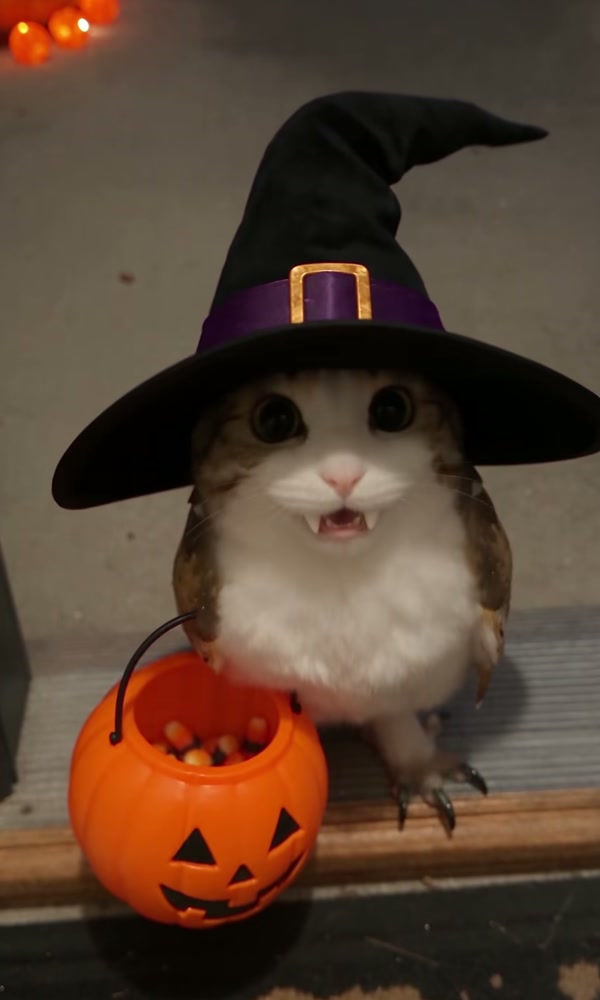
Upload one clear pet photo with visible eyes, ears, muzzle and coat markings. The template guides the witch hat, pumpkin bucket and two cute fangs; no costume is needed in the uploaded photo.
Use your own photo. JPG, PNG or WebP, under 5 MB each. Follow the role order shown in the generator.
- Open the door to the costumed pet
- Add candy and reveal the tiny fangs
- Turn and walk away with the bucket
Reference source: Reviewed user-provided reference
How to make a Pet Halloween video
Watch the complete reference
Open the Pet Halloween generator and play the preview through to the ending. Check the cast, action and camera framing before uploading.
Add the right photos
Upload one clear pet photo with visible eyes, ears, muzzle and coat markings. The template guides the witch hat, pumpkin bucket and two cute fangs; no costume is needed in the uploaded photo. Use clear images under 5 MB each. Assign each photo to its labeled role; select a reference or outfit when the template offers those options.
Choose a version and review the price
Select Standard or Premium and an available resolution. Check the displayed duration and final credit or checkout price before you submit. No prompt is required.
Check your video and download the MP4
Wait for the task to finish, then watch every shot, including turns and the ending. Download the finished MP4 within 30 days. If generation fails, follow the refund status shown for your order.
Pet Halloween AI is a photo-to-video effect for a cat or dog visiting a door for candy. The scene keeps the uploaded pet as the main character: a witch hat and pumpkin bucket establish the Halloween costume, and two tiny vampire fangs provide the reveal before the pet leaves. Use it for a trick-or-treat greeting or a seasonal pet reaction. You do not need a photo of an animal already wearing the costume. This differs from La Calabaza, which follows a coordinated dance, and from Witch Broom, which uses an adult rider and a road-sign collision. Choose the doorstep scene when the pet greeting and candy-bucket story are the result you want. Check the preview, photo requirements and selected output duration before paying.
To make this video, open the HuntClip Pet Halloween generator, upload one photo, select a version and quality, and generate a roughly 13-second 9:16 MP4 with sound and no watermark. No prompt or editing is needed. Sign in to use credits or choose guest checkout and receive the result link by email; check the selected price before paying.
What does this template recreate?
Pet greetings, Halloween posts and seasonal reaction clips.
- Open the door to the costumed pet
- Add candy and reveal the tiny fangs
- Turn and walk away with the bucket
Which photos should you prepare?
Upload one clear pet photo with visible eyes, ears, muzzle and coat markings. The template guides the witch hat, pumpkin bucket and two cute fangs; no costume is needed in the uploaded photo.
Use JPG, PNG or WebP, under 5 MB per image. Keep the eyes, face or muzzle and distinctive markings readable. Use photos you have permission to upload. A group photograph is not a substitute for separate identity photos where the template requires them.
How are the roles and options assigned?
Upload one clear pet photo with visible eyes, ears, muzzle and coat markings. The template guides the witch hat, pumpkin bucket and two cute fangs; no costume is needed in the uploaded photo.
How many credits does it cost?
The output is about 13 seconds in 9:16. Standard costs 15 credits at 480p or 25 at 720p. Premium costs 25 at 480p, 35 at 720p or 55 at 1080p. Availability is shown in the generator. Higher resolution does not repair an incorrect cast assignment or recover detail absent from a lower-resolution reference.
What should you check before paying?
The reference guides motion and camera work; photos define identity. This is generative video, not deterministic frame-by-frame face replacement. Likeness can vary across turns, occlusion, back views and the ending, so inspect more than the opening seconds. Generated audio does not guarantee the original song, recording or exact lip sync. Waiting times are estimates. Failed generation returns the charged credits. Uploaded originals are retained for 7 days and outputs for 30 days; download your work in time. When your finished video is ready, HuntClip sends an email: signed-in customers open My creations, while guests receive a private order link at the checkout email address.
References and next steps
- Reviewed user-provided reference: a reference for the style, not proof of a HuntClip generated result.
- Open the Pet Halloween generator
- Photo preparation guide
- Pricing and files and refund policy
Questions before you create
How do I make a Pet Halloween AI video from my photo?
To make a Pet Halloween video with HuntClip, open this template and add 1 photo(s). Choose a version and quality, then generate a roughly 13-second 9:16 MP4 with sound and no watermark. Standard 480p uses 15 credits. You can sign in to spend credits or choose guest checkout with email delivery; the selected cash price is shown before payment. No prompt or editing is needed. Upload one clear pet photo with visible eyes, ears, muzzle and coat markings. The template guides the witch hat, pumpkin bucket and two cute fangs; no costume is needed in the uploaded photo.
What happens in the Pet Halloween video?
Your witch-hat pet visits the door for candy, reveals two tiny vampire fangs and leaves with a pumpkin bucket.
What photos should I upload?
Upload one clear pet photo with visible eyes, ears, muzzle and coat markings. The template guides the witch hat, pumpkin bucket and two cute fangs; no costume is needed in the uploaded photo.
How many credits does Pet Halloween cost?
Standard: 480p costs 15 credits and 720p costs 25. Premium: 480p costs 25, 720p costs 35, and 1080p costs 55. The selected price appears before submission. Failed generation returns the charged credits.
When should I choose this template?
Pet greetings, Halloween posts and seasonal reaction clips.
Will the video include the exact original song or voice?
Audio is generated with the video. Rhythm, speech and ambience may differ from the reference; the exact original recording, lyrics, voice and lip sync are not guaranteed. Review the finished video and use music you have permission to publish.
What happens if generation fails?
Confirmed failed tasks refund their generation credits. If the provider result is uncertain, use Recover in the studio to check the existing task before trying again.
Ready to make your version?
Pet greetings, Halloween posts and seasonal reaction clips.
Make my Pet Halloween videoPreview first. Choose your version and check the price before generating.