How to Make Window Peeper Videos: Photos, Steps and Cost
Create a Window Peeper AI video from one photo. Watch the window zoom, burger stare and curtain ending. Make a 10-second clip with sound and no watermark.
Quick answer
To make a Window Peeper video with HuntClip, open this template and add 1 photo(s). Choose a version and quality, then generate a roughly 10-second 9:16 MP4 with sound and no watermark. Standard 480p uses 15 credits. You can sign in to spend credits or choose guest checkout with email delivery; the selected cash price is shown before payment. No prompt or editing is needed.
Window Peeper is a suspense-comedy reversal: the viewer looks into a lit apartment, but the diner is already looking back. This complete 10-second reference starts outside the building, pushes toward one window, holds on the burger and stare, then ends when the curtain blocks the view. Your photo replaces only the adult inside; the room, window and camera sequence come from the reference.
Make my Window Peeper videoPreview first. Choose your version and check the price before generating.
See the reference before you create
What should your photo show?
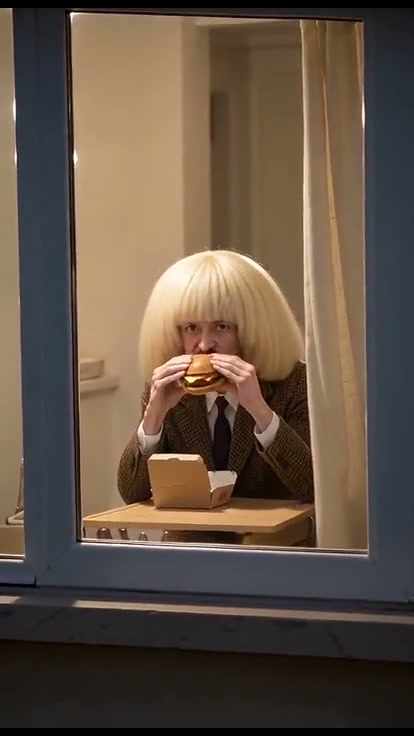
Upload one clear photo of an adult, facing the camera, with the head, shoulders and arms visible. Keep the eyes unobstructed. No burger, window or background photo is needed. This release is for one adult, not a group or pet.
Use your own photo. JPG, PNG or WebP, under 5 MB each. Follow the role order shown in the generator.
- Zoom from the apartment block into one lit window
- Eat a burger and stare directly back at the camera
- Lower the burger and pull the curtain shut
Reference source: Viberot · complete Window Peeper example
How to make a Window Peeper video
Watch the complete reference
Open the Window Peeper generator and play the preview through to the ending. Check the cast, action and camera framing before uploading.
Add the right photos
Upload one clear photo of an adult, facing the camera, with the head, shoulders and arms visible. Keep the eyes unobstructed. No burger, window or background photo is needed. This release is for one adult, not a group or pet. Use clear images under 5 MB each. Assign each photo to its labeled role; select a reference or outfit when the template offers those options.
Choose a version and review the price
Select Standard or Premium and an available resolution. Check the displayed duration and final credit or checkout price before you submit. No prompt is required.
Check your video and download the MP4
Wait for the task to finish, then watch every shot, including turns and the ending. Download the finished MP4 within 30 days. If generation fails, follow the refund status shown for your order.
Make a Window Peeper AI video from one photo. A night-time zoom finds you eating a burger at the window, staring back before pulling the curtain shut.
What happens in this template?
Window Peeper is a suspense-comedy reversal: the viewer looks into a lit apartment, but the diner is already looking back. This complete 10-second reference starts outside the building, pushes toward one window, holds on the burger and stare, then ends when the curtain blocks the view. Your photo replaces only the adult inside; the room, window and camera sequence come from the reference.
Choose this for a fictional nosy-neighbor joke, a deadpan reaction or a spooky Halloween post. Choose Witch Broom instead if you want outdoor action rather than a stare-and-curtain punchline.
Which photo should I upload?
Upload one clear photo of an adult, facing the camera, with the head, shoulders and arms visible. Keep the eyes unobstructed. No burger, window or background photo is needed. This release is for one adult, not a group or pet.
How do I make my video?
- Watch the entire selected reference, including the ending. Choose this scene only if it matches the clip you want to recreate.
- Upload one JPG, PNG or WebP photo under 5 MB. Follow this template’s photo and identity requirements below the uploader.
- Select your version and resolution. Check the exact credit price or guest cash total and currency before submitting. You do not need to write a prompt or edit a timeline.
- Wait for the task, then watch the entire result. Check face consistency, hands, props and the ending. Download the finished MP4 within 30 days.
What is included in the output?
A vertical 9:16 MP4 with generated sound and no watermark. No prompt, no editing. The target duration is 10 seconds; the selected reference shown on the page determines the motion.
- Zoom from the apartment block into one lit window
- Eat a burger and stare directly back at the camera
- Lower the burger and pull the curtain shut
Does Window Peeper include the original laugh track?
The reviewed example is silent. HuntClip generates sound for the scene; it does not promise the original laugh track or recording. This is fictional AI entertainment, not footage of a real neighbor.
Will I get the original music?
Sound is generated with the action. Rhythm and ambience may differ from the reference. An identical song recording, voice or precise lip sync is not guaranteed; you can choose licensed music in your publishing app.
How much does it cost?
Standard 480p is 15 credits; Standard 720p is 25. Premium is 25 at 480p, 35 at 720p and 55 at 1080p. Guest cash prices depend on the selected version, resolution and currency and appear before payment. Confirmed failed credit tasks return their credits; guest cash refunds follow the order status and refund policy.
What should I check in the result?
Use the complete reference as your checklist, not just the opening frame. Identity may vary during profile turns, occlusion and fast gestures. The previews are reviewed reference footage, not a paid HuntClip generation test. Photos are retained for 7 days and finished videos for 30 days.
Reference and next steps
Questions before you create
How do I make a Window Peeper AI video from my photo?
To make a Window Peeper video with HuntClip, open this template and add 1 photo(s). Choose a version and quality, then generate a roughly 10-second 9:16 MP4 with sound and no watermark. Standard 480p uses 15 credits. You can sign in to spend credits or choose guest checkout with email delivery; the selected cash price is shown before payment. No prompt or editing is needed. Upload one clear photo of an adult, facing the camera, with the head, shoulders and arms visible. Keep the eyes unobstructed. No burger, window or background photo is needed. This release is for one adult, not a group or pet.
Does Window Peeper include the original laugh track?
The reviewed example is silent. HuntClip generates sound for the scene; it does not promise the original laugh track or recording. This is fictional AI entertainment, not footage of a real neighbor.
What happens in the Window Peeper video?
Make a Window Peeper AI video from one photo. A night-time zoom finds you eating a burger at the window, staring back before pulling the curtain shut.
What photos should I upload?
Upload one clear photo of an adult, facing the camera, with the head, shoulders and arms visible. Keep the eyes unobstructed. No burger, window or background photo is needed. This release is for one adult, not a group or pet.
How many credits does Window Peeper cost?
Standard: 480p costs 15 credits and 720p costs 25. Premium: 480p costs 25, 720p costs 35, and 1080p costs 55. The selected price appears before submission. Failed generation returns the charged credits.
When should I choose this template?
Choose this for a fictional nosy-neighbor joke, a deadpan reaction or a spooky Halloween post. Choose Witch Broom instead if you want outdoor action rather than a stare-and-curtain punchline.
Will the video include the exact original song or voice?
Audio is generated with the video. Rhythm, speech and ambience may differ from the reference; the exact original recording, lyrics, voice and lip sync are not guaranteed. Review the finished video and use music you have permission to publish.
What happens if generation fails?
Confirmed failed tasks refund their generation credits. If the provider result is uncertain, use Recover in the studio to check the existing task before trying again.
Ready to make your version?
Choose this for a fictional nosy-neighbor joke, a deadpan reaction or a spooky Halloween post. Choose Witch Broom instead if you want outdoor action rather than a stare-and-curtain punchline.
Make my Window Peeper videoPreview first. Choose your version and check the price before generating.